Explore Courses
Top University
Search anything
 Refer and Earn ₹ 5000
Isha
Published on 05 March, 2026
Learning Routes Editorial Team
Reviewed and updated
Yashwantrao Chavan Maharashtra Open University declares the course-wise results at the official website ycmou.ac.in. You can check the YCMOU result using the PRN number. Online applications for re-checking, re-assessment, and procuring a certified copy of the answer book are made through e-suvidha account within the stipulated time.
YCMOU conducts exams for its distance UG & PG courses twice a year in two exam sessions: Dec/Jan and May/June. The results for the YCMOU June exam 2026 are expected to be announced in July/August 2026. With this blog, we shall provide you with YCMOU result dates 2026, steps to download the results, and various other crucial information. Continue reading to learn about the YCMOU result details to check and more.
Yashwantrao Chavan Maharashtra Open University has declared the YCMOU result 2026 in February for the exam session Dec/Jan. The next exam session of YCMOU is expected to take place in May/June 2026. For which, the results shall tentatively be announced in July/August 2026. Sometimes, the dates of YCMOU June exam results may extend to September, depending on the situation. Here is a quick overview of the YCMOU result:
You May Also Read:
YCMOU has made its results available online on its official website for the Dec/Jan exam. From the 6th February 2026 onwards, the university is continuously uploading student results for various courses, one by one. Currently, YCMOU results for BA, MA, BLISc, MLISc, BBA, MSc, and MCA have been announced, including several diploma courses. The results for the remaining courses shall be declared by the end of February or the beginning of March 2026. You may explore the available YCMOU result 2026 dates:
You can download YCMOU result 2026 from the official website of the university at ycmou.ac.in. The results are available in digital mode that can be saved to your device for future reference. Here is the step-by-step process to download the YCMOU result:
📝 Visit the official website of YCMOU: ycmou.ac.in.
📝 Navigate to “Student Zone” by clicking on the “Menu” in the top-right corner.
📝 Click on the “Examination Information”.
📝 You would be redirected to the “Examination” page, where you need to click on “Results”.
📝 A new page shall open, tap on “Click Here for Online Provisional Result”.
📝 The list of available or announced results for each course would open.
📝 You need to click on “Click Here” for your desired exam session and course.
📝 Next, choose “Exam Event” from a dropdown box.
📝 Enter your PRN or seat number or roll number and “Captcha”.
📝 Click on the “Search” button to access your result.
📝 Download the result on your device for future reference.
Note: The result portal contains two ways to download YCMOU result: PRN Starting with 25 and PRN Starting with 20. The requirements for credentials may slightly vary for both.
The process to download the YCMOU result varies depending on your PRN Number. At YCMOU, PRN refers to the Permanent Registration Number, which can be used to see your results. Once you visit the list of results on the YCMOU website, you have to tap on “Click Here” for your course. The page would redirect you to the YCMOU result login page, containing two options: “PRN Starting with 25” and “PRN Starting with 20”. Candidates with PRN beginning with 25 need to use the first link, while the other is preferable for candidates with PRN beginning with 20. Here is how to check the result with these links:
You need to use the “PRN Starting with 25” link if your PRN begins with 25. By clicking on it, you would be redirected to the “YCMOU Student Login”. To access your account:
✅ You need to enter your “PRN No.” and “Date of Birth”.
✅ Click on the “Login” button to access your account.
✅ Here, you can check out your results and download.
Anyone whose PRN starts with 20 needs to click on the “PRN Starting with 20” link. It would redirect you to the YCMOU result login window 2026 at ycmou.digitaluniversity.ac/SearchDuplicateResult.aspx?ID=861. Here you need to:
✅ Choose “Exam Event” and enter your PRN/seat number/ roll number.
✅ Type “Captcha” in the available dialogue box and click on the “Search” button.
✅ Your result would open, verify the information, and download it for future reference.
Also Read: Top 10 Online MBA Colleges in India
YCMOU result 2026 login window features the “Exam Event” box and the credentials box. The page also contains several links, redirecting you to exam results for previous sessions. Here is a quick view of the YCMOU result login page:
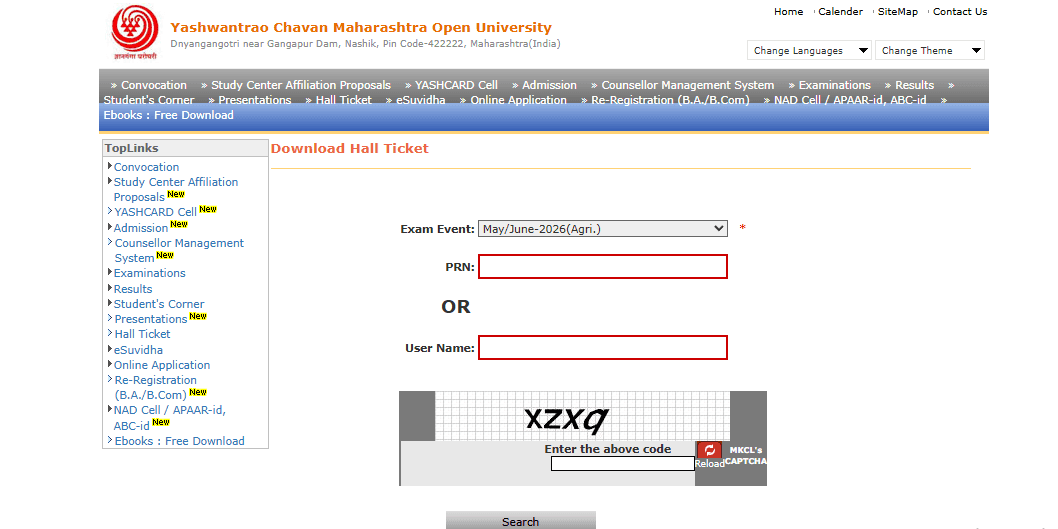
Source: ycmou.digitaluniversity.ac
Yashwantrao Chavan Maharashtra Open University result contains several crucial details to be checked. These are essential to verify, as in case of any ambiguity, you would have to connect with the university to resolve issues. Take a look at the essential details that you must check on the YCMOU result:
📝 Student Name
📝 Course Name
📝 Semester & Year
📝 Exam Session
📝 PRN (Permanent Registration Number)
📝 Seat Number
📝 Subject Names
📝 Subject Codes
📝 Total SGPA/CGPA
📝 Pass/Fail Status
YCMOU has several guidelines for its distance education learners. YCMOU result, which is available online, serves as a temporary document, providing a general overview of your performance in the exam. Check out the crucial instructions for YCMOU exam results:
✅ You could not seek admission to the next course based on the sole information shown in the YCMOU scorecard, digitally.
✅ Marks, results, and grades shown digitally should not be considered as the official or final mark sheet.
✅ The information shown in the e-result may differ from the final marksheet.
✅ The YCMOU result page is exclusively meant to provide you with quick information.
✅ You are advised to contact the university authorities in case of doubts or queries for clarification.
✅ Programme result means the final or overall result for an entire course (e.g., BA, BCom, BE, LLB, etc.). It is usually displayed in the Part Level Result / Last Semester Term.
✅ Part Result at YCMOU refers to year-end results. It showcases the result status of a particular year (1st year, 2nd year, or 3rd year).
✅ Term Result, on the other hand, refers to semester results. It shows the result status of a particular semester. (1st Sem, 2nd Sem, 3rd Sem, etc.)
✅ If any institute or verifying agency wishes to verify marksheets of those students with a PRN of 16 digit are required to visit: ycmou.digitaluniversity.ac. Then, locate “Results —> Exam Event —> Enter 16-digit PRN available on marksheet” and receive the desired verification.
✅ You have to apply through your e-suvidha account within the given timeline as per the rules to apply online for re-checking, re-assessment, answer sheet inspection, or a certified copy of your answer sheet. Any application received after the expiry of the stipulated period would not be accepted.
Yashwantrao Chavan Maharashtra Open University result is a crucial document. It serves as a provisional marksheet that you can use for temporary purposes. You may check out the YCMOU result for the 2026 January exams on the YCMOU official website. It is necessary to keep your PRN, seat or roll number ready with you to check out the results for YCMOU exams on its official portal. Additionally, it is recommended to verify the information available on the marksheet. You can cross-check it with your admit card or other documents with credentials. Make sure to contact the university in case of any error in the result to rectify it as soon as possible.
You need to score at least 38% - 40% out of 100 to qualify for YCMOU courses, exams and advance to the next session. In terms of CGPA, you must have at least 4/10 to qualify for the exam at YCMOU.
Yes, Yashwantrao Chavan Maharashtra Open University is approved by the University Grants Commission, providing legitimate and widely recognised UG and PG courses across various disciplines.
You can download the YCMOU result by PRN number by visiting its official website, ycmou.ac.in. Here, you have to click on “Examination Information”, the section available in “Student Zone” on the homepage. The page shall redirect you to a page containing “Results”, click on it to view the list of available YCMOU results for the current session. You can use your PRN, seat number, or roll number to check out the YCMOU result and download the marksheet.
Verify the details mentioned on the YCMOU result, such as your name, course name, current semester and academic year, seat number, PRN, subject names and subject codes. Then, you can download the result to your device. However, if you find any discrepancy or error in information, you can reach out to the YCMOU exam department immediately regarding the concern.
Yes, a degree from Yashwantrao Chavan Maharashtra Open University is valid for government and private jobs as it is approved by the University Grants Commission (UGC). The university itself is recognised by NAAC with an A grade.
Our team of experts, or experienced individuals, will answer it over online meet. Book your slot now!
Book Free Online Counselling
Get Free Career Guidance