Explore Courses
Top University
Search anything
 Refer and Earn ₹ 5000
Delhi University SOL Pragyan is a centralised platform for academic resources, such as SLM and internal assessments. It fosters an anytime learning approach by making the coursework available to you digitally. The full form of Pragyan is Platform of Remote Accessibility towards Guiding Youth for Academic Nurturing. It allows you to continue learning from digital resources and track your progress. Furthermore, the platform also facilitates inclusive learning through discussion forums, allowing you to connect with peers and share your ideas.
You can access the DU SOL Pragyan portal login through the official website of DU OLDC: oldcdu.ac.in. You would need a SOL roll number and barcode, printed on your SOL ID card, to log in to the Pragyan portal. Continue reading to learn about the DU SOL Pragyan portal in detail. Discover how to log in to DU SOL Pragyan, what it includes, where you can access it, and more.
You can access the DU SOL Pragyan portal directly through its webpage URL. It allows you to skip the step-by-step navigation process and directly visit the page. With the direct link for the DU SOL Pragyan portal, you just need to enter your credentials for login and access your account. Here is the direct link for DU SOL Pragyan Portal login:
Direct Link: DU SOL Pragyan Login Page
DU SOL Pragyan is a digital learning management system for the students of the DU School of Open Learning. It is an initiative taken by the DU SOL Open Learning Development Centre (OLDC) for SOL and COL learners, connected to DU through an open and distance mode of learning. This is a platform that contains various study materials, such as e-books, PDFs, video lectures, etc., related to your course. It caters to the flexible learning requirements of learners, so you can study from anywhere. Furthermore, it also allows you to track your performance based on learning. Here are some of the crucial features of the DU SOL Pragyan portal covered:
DU SOL Pragyan is a common platform for all the digital learning content that you would require throughout the course. It contains your subject-related e-books, PDFs, and recorded video lectures that you can study from anywhere. Moreover, all the DU SOL announcements are uploaded to the Pragyan portal. Therefore, you do not have to worry about staying alert to DU SOL notifications. Additionally, the study content on the Pragyan is made available for your current semester/year. It is automatically updated for the next term/session as you progress. Check out several crucial contents that the DU SOL Pragyan portal contains:
The portal offers you access to self-learning material (SLM) in a digital format. It includes various e-books, PDFs, and audio/video learning content. Furthermore, you can have access to continuous assessments, including quizzes, unit-wise assignments, and more. Furthermore, these academic resources are frequently updated as your semester changes.
DU SOL Pragyan serves as an epicentre for all the DU SOL announcements, especially the ones related to your academic course. By logging in to your Pragyan account, you could access the notifications regarding your exams, new updates, and even deadlines for a particular assignment in one place. This is one of the top features of the DU SOL Pragyan portal.
Pragyan portal comprises a set of assignments unit-wise or subject-wise for your current semester/year. Pragyan Portal DU SOL internal assessments are used for continuous evaluation and help you with learning. The portal allows you to solve the assignment, submit, and see grades in real-time. It would be updated as you progress to the new semester or year.
The first and foremost page of DU SOL Pragyan is the dashboard. It contains various sections on the home page, including academic resources, results, student details, etc. You can consider it as a centralised platform for all the student information, primarily study material. Here are crucial aspects of the DU SOL Pragyan portal academic dashboard that you may find on the web portal:
✅ Your personal information
✅ Semester details & subjects’ list
✅ Exam announcements and timelines
✅ Deadlines of internal assignments
✅ Track record of your learning progress
✅ Schedules lectures/webinars/guest sessions, if any
Last but not least, DU SOL Pragyan facilitates basic student support throughout the course that you may require. It may involve discussion forums, allowing you to interact with faculty or peers. Quick updates to real-time notifications and raising tickets to address concerns are other vital features of Pragyan student support.
The Delhi University School of Open Learning Pragyan portal is available and accessible to each student enrolled in DU SOL courses. No matter if you are an undergraduate or postgraduate learner, the portal is designed for everyone to cater to academic services. Students of DU SOL from any course and semester are given access to Pragyan. Though some students may rely on hardcopy SLM to progress in their course in the beginning, you are most likely to use it for internal assignments. Take a look at who can access the DU SOL Pragyan portal:
📝 Students enrolled in DU SOL UG courses
📝 DU SOL PG learners
📝 Students pursuing an MBA from DU SOL
📝 All semester students of SOL UG/PG courses
School of Open Learning (SOL), Campus of Open Learning (COL), and Department of Distance and Continuing Education (DDCE) are the combined initiatives of Delhi University for open & distance education. These are operated under the DU Open Learning Development Centre (OLDC). Therefore, the learning facilities offered for ODL learners can primarily be accessed through the official website of OLDC, including the Pragyan portal. Here are the steps to access the DU SOL Pragyan portal login:
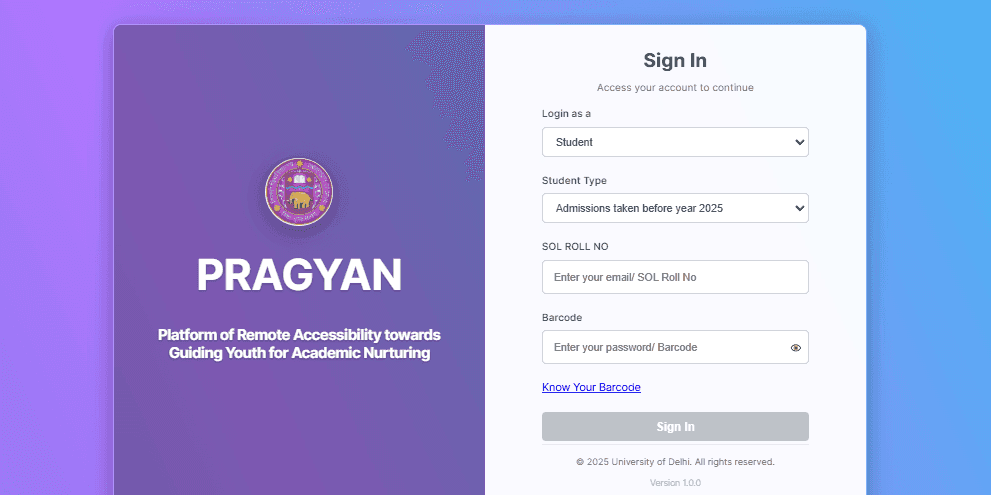
Source: oldcdu.ac.in.
🎓 You have to visit the official website of DU OLDC for DU SOL Pragyan login: oldcdu.ac.in.
🎓 Click on the three lines available in the top-right corner to open the “Menu” tab.
🎓 You need to tap on the “Facilities” option, and a list of DU SOL academic resources shall appear.
🎓 You are required to click on “PRAGYAN LMS”.
🎓 A new page shall appear, where you have to tap on “Visit Pragyan” or “Student Login”, available in the middle of the page.
🎓 Clicking on “Visit Pragyan” or “Student Login”, you would be redirected to the “DU SOL Pragyan Login” page.
🎓 Now, log in as “Student” and choose your student type: UG/PG.
🎓 You have to enter your “SOL Roll Number” or “registered email”.
🎓 Next, you need to enter your password or barcode.
🎓 Click on the “Sign In” button and your DU SOL student dashboard at Pragyan shall open.
No, the DU SOL student dashboard and the DU SOL Pragyan portal serve different purposes. DU SOL student login for the dashboard provides you with access to your academic information, such as fees and admissions. However, DU SOL Pragyan is primarily designed for learning purposes and internal assignments. Check out which portal you should access for different DU SOL purposes:
Access the DU SOL student dashboard, if the requirements include:
📝 Fee payment schedules
📝 Downloading fee receipts
📝 Admission enquiry
📝 Document submission
Access DU SOL Pragyan, if your concerns are:
📝 Internal assignments
📝 Learning from e-books
📝 Access to study material
📝 Viewing attendance
📝 Tracking your academic performance
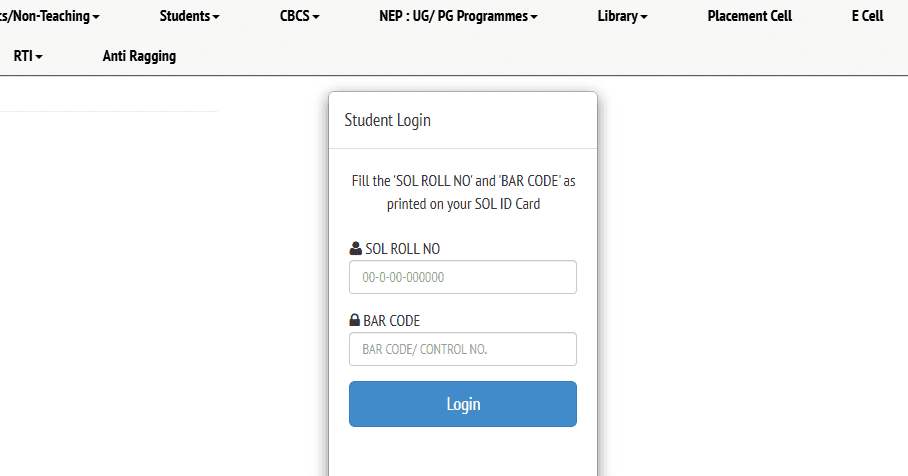
You can log in to your DU SOL student dashboard by visiting the official website of SOL @ sol.du.ac.in. You just need to enter your roll number and barcode/control number to access your DU SOL account. Check out the step-by-step process for DU SOL student login:
Source: sol.du.ac.in.
🎓 Visit the official website of DU SOL: sol.du.ac.in.
🎓 Scroll down and click on “Continue to SOL Website”, located at the bottom of the page.
🎓 You would be redirected to the homepage of DU SOL: sol.du.ac.in/home.php.
🎓 In the top right corner, there is a button labelled “Continue to Website”; tap on it.
🎓 Now, you would be redirected to a new page for DDCE/COL/SOL Admission.
🎓 Click on the icon for “Student Dashboard”, and the DU SOL student login page shall appear.
🎓 You have to enter your “SOL Roll Number” and “Bar Code / Control Number”, printed on your SOL ID card.
🎓 Click on the “Login” button, and your DU SOL student dashboard would appear.
The DU SOL Pragyan portal is dedicated to making the distance learning experience seamless for SOL ODL students. It caters to the learning requirements of a student enrolled in a particular course by providing all crucial study material in one place. It allows you to attempt internal assessments that further contribute to final result preparation. The portal can be accessed anytime, anywhere, by using your login credentials, roll number and barcode. Moreover, DU SOL Pragyan is a facility available to each student of DU SOL, enrolled in a course. Explore its features and use the step-by-step guide listed above to log in to your Pragyan account.
Pragyan is a common academic platform for the crucial digital study material, especially internal assignments at DU SOL. It contains e-books, PDFs, and internal assessments for continuous learning and evaluation, depending on your course and term.
SOL is an acronym for School of Open Learning, which is an open and distance learning initiative of Delhi University.
Student login ID could be your user name, a unique ID assigned by your university, or a roll number that you use to access your student dashboard or Learning Management System (LMS) for a particular university.
This is basically the DU SOL roll number that you use to access your account on the Pragyan LMS portal.
DU SOL Pragyan login requires you to enter the barcode or password along with your SOL roll number. In case you have forgotten your barcode, you need to click on “Know Your Barcode”, available on the Pragyan login page. You have to enter your SOL Roll Number, your registered mobile number, and Captcha and click on the “Submit” button. Check your barcode and use it for the DU SOL Pragyan portal login.
Our team of experts, or experienced individuals, will answer it over online meet. Book your slot now!
Book Free Online Counselling


Get Free Career Guidance